WordPress 7.1.3: What the Security Update Fixes and Why You Need to Update Now

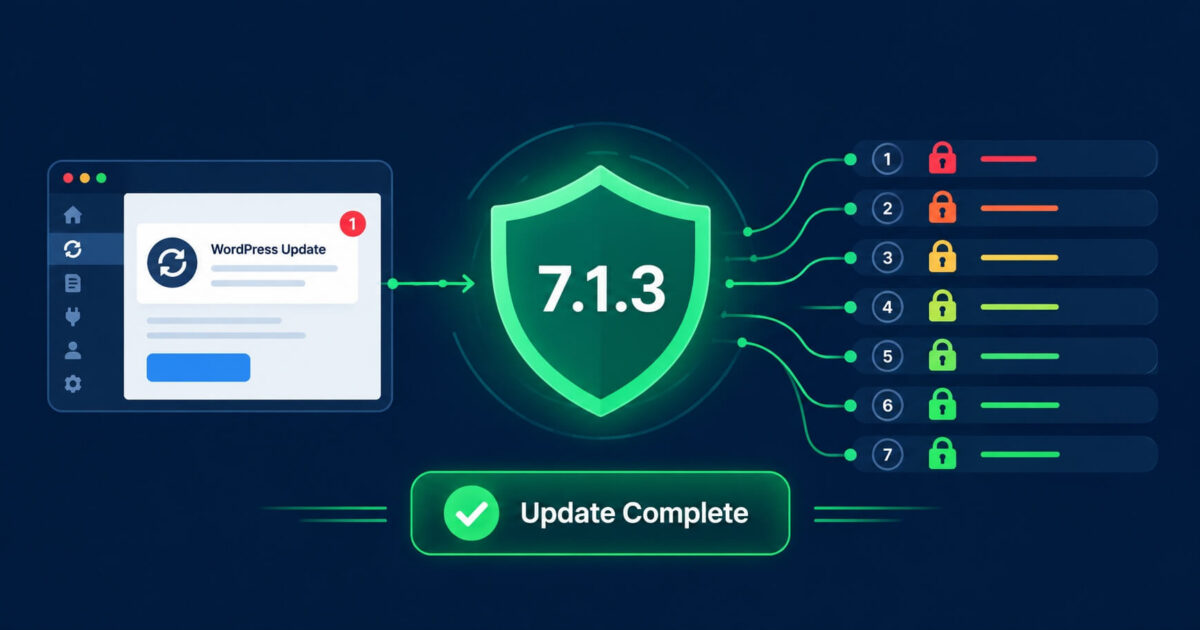
WordPress 7.1.3 was released on 6 October 2026. It is a security and maintenance release that patches seven security vulnerabilities, four of which were reported by Anthropic and Trail of Bits using AI-assisted security research. If your site has not yet updated, it should be treated as a priority this week.
What Does WordPress 7.1.3 Fix?
The release patches seven security vulnerabilities across WordPress core. Here is what each one means in plain terms.
1. Stored XSS on the Comments Admin Page
A cross-site scripting (XSS) vulnerability could be triggered through pending comments on the Comments admin page. In practice, this means a malicious actor could submit a comment containing a crafted script payload, and if an administrator viewed that pending comment in the dashboard, the script could execute in their browser. This is a common technique for stealing admin session cookies or creating rogue admin accounts. Reported by Trail of Bits with OpenAI.
2. Denial-of-Service in WP_Http::make_absolute_url()
A flaw in the way WordPress handles URL processing in its HTTP library could be used to trigger a denial-of-service condition. An attacker could craft requests that consume excessive server resources, potentially making a site unresponsive. Reported by Anthropic.
3. Second-Order SQL Injection in the WXR Export Feature
A SQL injection vulnerability was found in the WordPress export (WXR) feature. SQL injection vulnerabilities allow attackers to interfere with database queries, potentially reading sensitive data, modifying database contents, or in serious cases gaining further access to the server. This class of vulnerability is one of the most serious in web application security. Reported by Anthropic.
4. Author-Role Users Could Make Posts Sticky
A privilege escalation weakness allowed users with the Author role to make posts sticky, a capability that should be restricted to editors and administrators. While lower severity than the SQL injection or XSS issues, privilege escalation vulnerabilities are how attackers with limited access expand their foothold on a site. Reported by Anthropic.
5. Unauthenticated Disclosure of Comments on Private and Unpublished Posts
An information disclosure vulnerability meant that comments left on private posts or posts pending publication could be read by unauthenticated visitors. If your site has private posts containing sensitive content with comments attached, those comments were potentially visible. Reported by Ananda Dhakal of Patchstack.
6. XSS in Imgur Embeds
A cross-site scripting vulnerability was found in the way WordPress handles embedded Imgur content. Malicious embed code could be used to execute scripts in a visitor’s browser. Reported by Zhengyu Liu, Jingcheng Yang, and Gavin Zhong.
7. Forgeable Parameters in the {status}_{type} Hook
A logic flaw allowed parameters passed to the WordPress action hook system to be forged in a way that caused hook name collisions. This could be exploited to interfere with expected WordPress behaviour in ways that are difficult to predict, potentially bypassing security checks that rely on specific hook names. Reported by Alex Concha of the WordPress security team.
Should You Update to WordPress 7.1.3?
Yes, immediately. WordPress itself recommends updating right away, and this is not routine advice to ignore. Three of the seven fixes address vulnerabilities that could lead to cross-site scripting, SQL injection, or denial-of-service attacks on your site. These are serious vulnerability classes that attackers actively exploit in the wild.
If your site has automatic background updates enabled, it may have already updated. Check your dashboard under Updates or look for the version number in the footer of the WordPress admin area.
How Do You Update to WordPress 7.1.3?
Updating is straightforward but there is a right way to do it, particularly if your site is running plugins or a custom theme.
- Take a full backup first. Before updating WordPress core, run a complete backup of your files and database. If anything goes wrong during the update, a clean backup is the only reliable recovery route.
- Check plugin and theme compatibility. Visit the changelog for any critical plugins and confirm they are compatible with WordPress 7.1.3. Most major plugins update quickly after a core release, but it is worth checking before you update on a live site.
- Update via Dashboard > Updates. In your WordPress admin, go to Dashboard, then Updates. You will see WordPress 7.1.3 listed if you have not yet applied it. Click Update Now.
- Test your site after updating. Check your homepage, contact forms, and any checkout or booking flows to confirm everything works correctly post-update.
What If You Are on an Older Version of WordPress?
The WordPress security team has backported fixes to older supported versions going back to WordPress 4.7. If you are running an older version and cannot update to 7.1.3 right now, check your updates panel for a security-only patch for your current version.
That said, only the most recent version of WordPress receives full support and all security fixes. Running WordPress 5.x or 6.x in 2026 is a significant risk the backported patches do not always cover every vulnerability, and there is no guarantee of continued backport support beyond a certain point. The correct long-term answer is to update to the current version.
What Is Significant About How These Vulnerabilities Were Found?
Four of the seven fixes in WordPress 7.1.3 were reported by Anthropic and Trail of Bits using AI-assisted security research. This marks a shift in how vulnerabilities in widely-used software are being discovered. AI models are now being used to systematically audit large codebases for vulnerability patterns that would take human researchers weeks to cover manually.
For WordPress site owners, the practical implication is simple: security research is accelerating, which means the time between a vulnerability being discovered and it being exploited in the wild is compressing. Staying current on updates is more important than it has ever been.
Is My WordPress Site Safe If I Have Updated?
Updating WordPress core closes the vulnerabilities patched in this release. However, WordPress core vulnerabilities are only one attack vector. The majority of WordPress hacks in 2026 come through vulnerable plugins and themes, not core. Updating to 7.1.3 is necessary but not sufficient your plugin stack also needs to be current, and you should have a security plugin and a proper backup strategy in place.
If you are not sure whether your site is fully up to date or secure, run a free scan and we will check your WordPress version, plugin versions, and security configuration. If your site is showing signs of compromise, our emergency service responds the same day at a fixed, transparent price with a no-fix no-fee guarantee.
Frequently Asked Questions
WordPress 7.1.3 was released on 6 October 2026. It is a security and maintenance release patching seven security vulnerabilities and four bugs.
Yes. The release patches a SQL injection vulnerability, two cross-site scripting vulnerabilities, and a denial-of-service flaw. WordPress recommends updating immediately.
Maintenance and security releases like 7.1.3 are designed to be safe to apply without breaking existing functionality. Always take a full backup before updating, and test your site after the update is applied.
The WordPress security team has backported some fixes to older supported versions. However, only the most recent version receives full security coverage. Running WordPress 6.x or earlier in 2026 carries significant risk and upgrading to 7.1.3 is strongly recommended.
Log into your WordPress admin area. The version number appears in the footer of every admin page, or you can go to Dashboard > Updates to see whether an update is available.
We Fix Hacked WordPress Sites
Fixed £495. No-fix no-fee. Response in under 2 hours — worldwide.
Get Emergency Help NowRelated Articles
PHP2Shell: The Critical PHP Vulnerability Affecting Every WordPress Site (2026)
Last week, the PHP Foundation disclosed two critical vulnerabilities under the name PHP2Shell. Both carry a severity score…
What Is WordPress MCP and Should You Use It?
WordPress MCP is one of the most talked-about new developments in the WordPress ecosystem in 2026, yet most…
What Is WordPress 7.0 and Should You Update? (Security Guide)
WordPress 7.0 “Armstrong” launched on May 20, 2026, and it is the most significant WordPress release since the…