WordPress Pharma Hack: What It Is, How to Find It, and How to Remove It

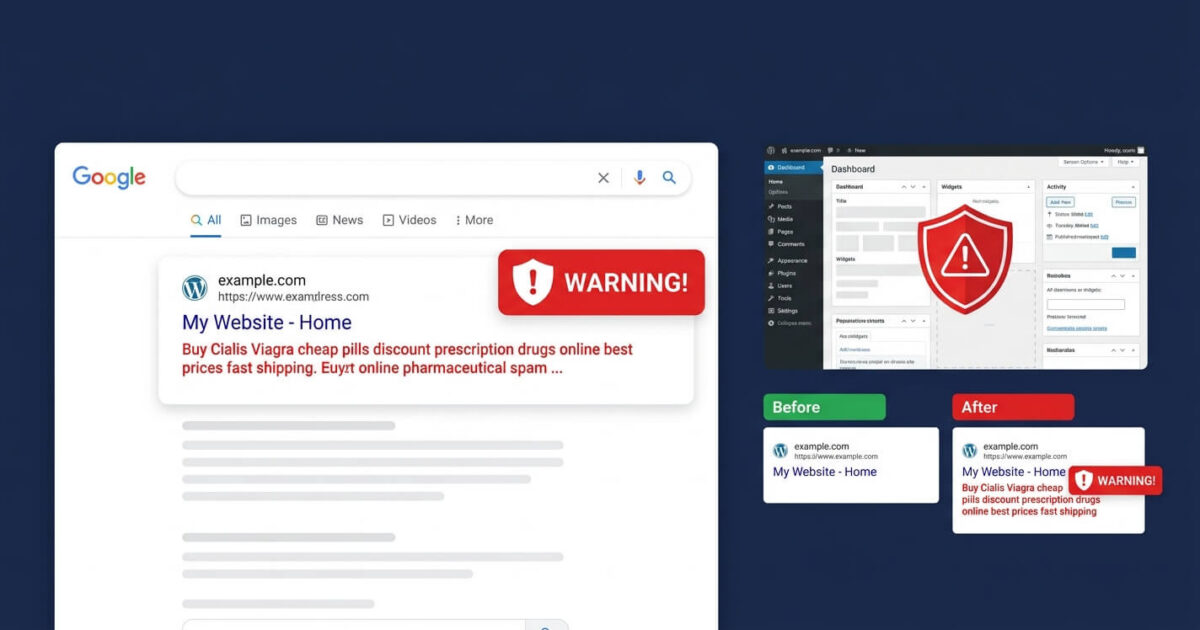
Your WordPress site looks completely normal. The homepage loads fine and the admin area shows nothing suspicious. But when you search for your site on Google, the results show titles and descriptions filled with Viagra, Cialis, and online pharmacy links. Your site is ranking for drug terms, and visitors arriving from search results are being redirected to online pharmacies. This is the WordPress pharma hack, and it is one of the most common and damaging infections affecting WordPress sites today.
What Is the WordPress Pharma Hack?
The WordPress pharma hack is a type of SEO spam attack that injects pharmaceutical spam into your site’s files and database. Its purpose is to make your site rank on Google for drug-related search terms, driving traffic to illegal online pharmacies selling medications such as Viagra, Cialis, Levitra, and Xanax. It is also sometimes called the Google Viagra hack, the pharmacy hack, or the conditional redirect hack.
What makes it particularly difficult to catch is cloaking. Search engine crawlers and ordinary visitors see the malicious content in full, while logged-in WordPress administrators see none of it. When you browse your own site while logged in, everything looks normal. As a result, the spam stays invisible to you but remains fully visible to Google and your site’s visitors.
Why Do Attackers Target WordPress Sites With Pharma Spam?
Online pharmacies selling prescription medications cannot advertise through Google Ads or most mainstream advertising platforms. Instead, they use compromised websites to rank in organic search results for high-value pharmaceutical keywords. As a result, your site, if it has any domain authority, becomes a free ranking asset for their illegal operation. The attack costs them nothing and earns them significant revenue at the direct expense of your site’s reputation, traffic, and search rankings.
What Are the Symptoms of a WordPress Pharma Hack?
Because the hack is designed to be invisible to administrators, you may not notice it for weeks or months. These are the most common signs that point to a pharma hack infection:
Signs Visible in Google and Search Console
- Drug keywords in Google search results: Your site appears in search results for terms like “buy Viagra online” or “cheap Cialis”. Search for your site name alongside a pharmaceutical term to check.
- Altered page titles in search results: Your homepage or high-traffic pages show drug-related titles or meta descriptions in Google, even though your actual pages look normal when you visit them.
- Spam pages indexed by Google: Run a
site:yourdomain.comsearch and you find hundreds or thousands of pharmaceutical spam pages that do not exist anywhere on your site. - Google Search Console warnings: Security issues flagged in Search Console, unknown users added to your property, or a sitemap replaced with one pointing to spam pages.
- Google blacklisting: Your site is flagged as dangerous in Chrome or removed from Google’s index entirely.
Signs on Your Own Site
- Unexpected redirects: Visitors arriving from Google are redirected to pharmacy websites. Logged-in administrators typically do not experience these redirects.
- Hosting account suspended: Your host detects the malicious content and suspends your account.
- Analytics anomalies: Traffic spikes from unexpected regions, sessions with unusually poor engagement, or sudden drops in rankings for your genuine target keywords.
Symptoms can be intermittent. Even if you check your site and everything looks normal, that does not confirm the site is clean. The cloaking means the hack may be active for visitors and search engines but invisible during your check.
Where Does the Pharma Hack Hide in WordPress?
The pharma hack typically installs itself across both your WordPress files and your database, with each component capable of reinfecting the other if either is only partially cleaned. Common hiding places include:
In Your Files
- Core WordPress folders: Malicious files injected into
/wp-adminand/wp-includes, or injected code added toindex.php,wp-config.php,wp-settings.php,wp-load.php, and.htaccess. - Plugin folders: Extra files added to active plugin directories, often disguised as legitimate plugin files with names like
class-akismet.phpordb-pluginname.php. Hidden files with pseudo-extensions like.cacheor.bakin the middle of the filename are a common indicator. - Theme files: Malicious code injected into
functions.phpor other theme files within/wp-content/themes. - Uploads folder: PHP scripts hidden inside
/wp-content/uploads, a directory that should never contain executable PHP files. - Root directory: Malicious scripts placed directly in
public_htmlor the site root. - Non-code files: Malicious code embedded inside favicon
.icofiles and other unexpected file types.
In Your Database
- wp_posts: Attackers inject spam content and links directly into post and page records.
- wp_options: Malicious code stored as option values in encoded form, often reversed or Base64-encoded by the attacker. Specific option names to check for include
wp_check_hash,class_generic_support,widget_generic_support,ftp_credentials, andfwp. - Cron entries: A scheduled task in
wp_optionsset to trigger reinfection on a timer, which is why sites that appear cleaned can reinfect themselves.
The obfuscation techniques used make manual detection difficult. Attackers typically encode payloads using Base64, string reversal, or Unicode character substitution. In practice, a simple text search for pharmaceutical keywords in your files will not find the infection, because the malware generates those keywords at runtime from the encoded strings.
How Do You Detect a WordPress Pharma Hack?
There are several detection approaches, ranging from quick external checks to thorough file-level scanning:
Quick External Checks
- Google site search: Search
site:yourdomain.com viagraorsite:yourdomain.com cialis. If pharma results appear, your site is infected. - Incognito browsing: Visit your site in an incognito window while not logged in to WordPress. Some infections display spam content to non-logged-in visitors but not to administrators.
- Mobile visit: Some pharma hacks are user-agent specific and only activate on mobile browsers. Check your site on a mobile device.
Tool-Based and Manual Checks
- Google Search Console: Check the Security Issues report for malware notifications, and review your sitemaps for ones you did not create.
- View page source: On a key page, right-click and view source. Search for pharmaceutical keywords in the raw HTML. The spam may be present in the source even when it is not visible on the rendered page.
- Online scanner: Run your URL through Sucuri SiteCheck (free). It checks publicly visible content for known malware signatures.
- FTP review: Log into your site via FTP, enable hidden file display, and look for files with unusual names in your plugin folders and root directory.
How Do You Remove a WordPress Pharma Hack?
Full removal requires addressing both the infected files and the database entries. In particular, cleaning only the files leaves database components that can restore the infection, and vice versa.
Clean Your WordPress Files
- Take a full backup before touching anything. Even a hacked site is better than no site at all. A backup gives you a recovery point if something goes wrong during cleanup.
- Put the site into maintenance mode. This prevents visitors from being exposed to redirects or spam content while you work.
- Replace WordPress core files. Download a clean copy of the same WordPress version from wordpress.org and replace the
/wp-adminand/wp-includesfolders entirely. Do not replacewp-contentorwp-config.phpat this stage. - Audit every active plugin folder. Via FTP, compare the contents of each plugin folder against the clean version from wordpress.org. Remove any files that were not in the original plugin. Enable hidden file display to catch dot-prefixed files. Particular attention should go to plugin folders that were active at the time the infection began.
- Check your theme files. Open
functions.phpand other theme files in a code editor. Look for encoded blocks,eval()calls,base64_decode(),gzinflate(), orstr_rot13()that do not belong to your theme’s legitimate functionality. If in doubt, compare against your theme’s original source files. - Block PHP execution in uploads. Create a
.htaccessfile in/wp-content/uploads/containing:<Files *.php> deny from all </Files>. This prevents any PHP files in uploads from executing.
Clean the Database and Restore Security
- Clean the database. In phpMyAdmin, search the
wp_optionstable for the malicious option names listed above (wp_check_hash,class_generic_support,widget_generic_support,ftp_credentials,fwp). Delete those rows. Also searchwp_postsfor pharmaceutical keywords in post content. - Remove rogue cron entries. In
wp_options, find thecronoption and inspect its value for any scheduled tasks you did not create. Rogue cron entries are how pharma hacks reinfect themselves after partial cleanup. - Change all credentials. Reset passwords for every WordPress user, your hosting control panel, FTP, and database. Force logout of all active sessions. Rotate the secret keys and salts in
wp-config.php. - Remove rogue admin accounts. Check your WordPress Users screen for administrator accounts you do not recognise and delete them.
- Run a full scan. Install Wordfence and run a complete file scan to catch anything you may have missed manually.
- Request reindexing in Google Search Console. Once the site is clean, submit your sitemap and request indexing of your key pages. Google typically takes several days to a week to update search results to reflect a clean site.
What Should You Do After Removing a Pharma Hack?
Cleaning the infection removes the immediate threat but does not address how attackers got in. Without closing the entry point, reinfection is likely within days. However, the steps below significantly reduce that risk. After cleanup:
- Update WordPress core, all plugins, and all themes to their current versions
- Remove any plugins or themes you are not actively using
- Delete any nulled or pirated plugins or themes immediately, as these are a primary distribution channel for pharma hacks
- Enable two-factor authentication for all administrator accounts
- Install a login attempt limiter to block brute force credential attacks
- Set up automated daily backups to an off-site location
- Configure a web application firewall to block malicious requests before they reach WordPress
How Long Does It Take Google to Remove Pharma Hack Results?
After your site is confirmed clean, Google typically takes between a few days and two weeks to recrawl and update its index. The spam results will disappear progressively as Google recrawls the affected pages. Additionally, submitting your sitemap and requesting indexing via Google Search Console speeds up this process. If your site was blacklisted, use the Security Issues report in Search Console to request a malware review once the site is confirmed clean.
Should You Attempt to Remove a Pharma Hack Yourself?
Manual removal is possible for technically capable site owners, but there are two significant risks. First, the obfuscation makes it easy to miss infected files during a manual sweep, particularly encoded database entries and hidden files in plugin folders. Second, leaving a single backdoor in place means the infection restores itself within hours. If you attempt manual cleanup and the pharma results return in Google within a few days, a component was missed.
To avoid that risk, run a free scan and we will identify what is on your site. If your site is actively infected, our emergency service responds the same day at a fixed, transparent price with a no-fix no-fee guarantee.
Frequently Asked Questions
What is the WordPress pharma hack?
The WordPress pharma hack is an SEO spam attack that injects pharmaceutical keywords and spam pages into your WordPress site to make it rank in Google for drug-related search terms. It is invisible to logged-in administrators due to cloaking, but fully visible to search engines and regular visitors.
How do I know if my WordPress site has a pharma hack?
Search Google for your domain alongside a pharmaceutical keyword, such as site:yourdomain.com viagra. If drug-related results appear, your site is infected. Other signs include altered page titles in search results, unexpected redirects to pharmacy sites, Google Search Console security warnings, and large numbers of unknown pages indexed by Google.
Can I see the pharma hack on my own site?
Usually not when logged in. The pharma hack uses cloaking to show spam content to search engine crawlers and regular visitors while hiding it from logged-in administrators. To see what Google and visitors see, check your site in an incognito window while not logged in, or view the page source of a high-traffic page and search for pharmaceutical keywords.
Will removing the infected files fix a pharma hack?
No, not by itself. The pharma hack stores components in both your WordPress files and your database, including a scheduled cron task that can restore deleted files. Removing only the files leaves the database components intact, which will rebuild the infection. Effective removal must address files, database entries, cron jobs, and any backdoors left behind.
How long does it take for pharma hack results to disappear from Google?
After the site is confirmed clean, Google typically takes between a few days and two weeks to recrawl and update its index. Submitting your sitemap and requesting indexing in Google Search Console speeds up the process. If your site was blacklisted, request a malware review via the Security Issues report in Search Console once the infection is fully removed.
We Fix Hacked WordPress Sites
Fixed £495. No-fix no-fee. Response in under 2 hours — worldwide.
Get Emergency Help NowRelated Articles
How to Remove Malware from WordPress (Without Breaking Your Site)
Most malware removal guides tell you to install a plugin and click “Clean.” That’s not wrong it’s just…