10 Warning Signs Your WordPress Site Has Been Hacked (Most Owners Miss #6)

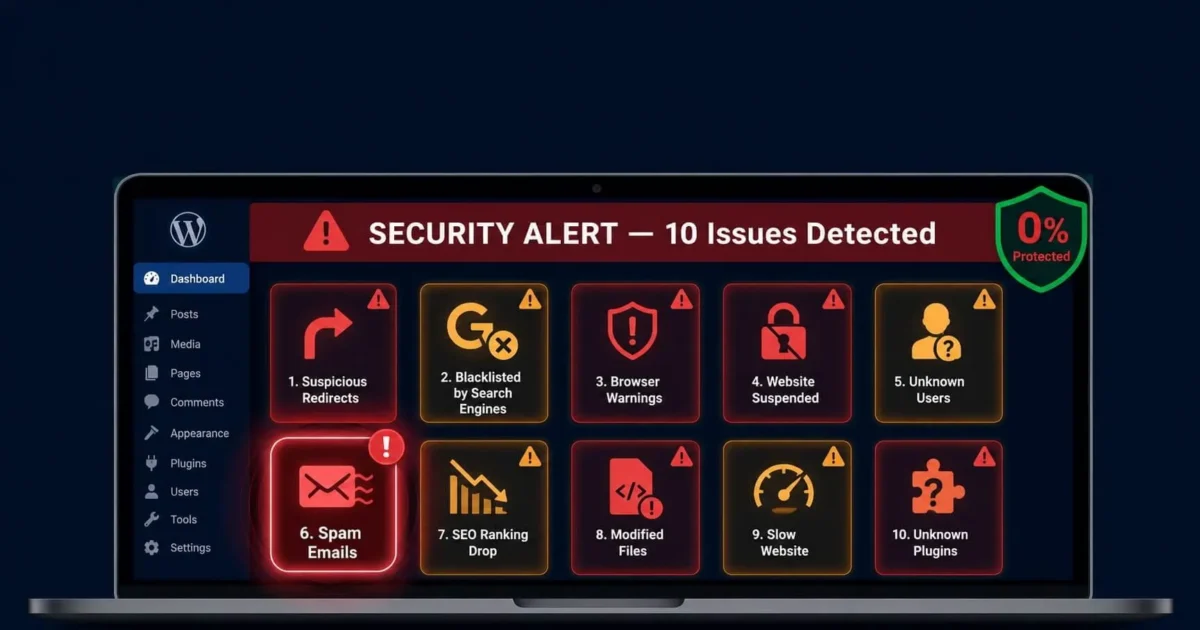
Here’s the uncomfortable truth: the average WordPress site is infected for 197 days before the owner realises it. Hackers aren’t always trying to take your site down. Often, they want to run quietly in the background using your server to send spam, stealing customer data, or using your domain authority to rank their own content.
Knowing what to look for means you catch it in days, not months.
1. You’re Being Redirected to Another Website
The most obvious sign. You type in your URL and end up on a gambling site, adult site, or a fake pharmaceutical store. The redirect usually only happens to users coming from Google (not direct visitors), which is why site owners often miss it you’d only notice it if you clicked your own listing in search results.
2. Google Search Results Show Wrong Content
Search for your own domain in Google. Do the page titles and descriptions match what’s on your site? If you see Japanese characters, pharmaceutical terms, or anything completely unrelated to your business you’re infected with an SEO spam hack.
3. A Browser Warning Page
Chrome, Firefox or Safari showing a red “Deceptive site ahead” or “This site may harm your computer” warning means Google’s Safe Browsing has flagged your site as dangerous. This is already very serious your traffic will have dropped significantly.
4. Your Hosting Provider Suspended Your Account
If your host suspends your account citing malware, spam emails, or suspicious activity that’s them telling you directly. Don’t ignore it or assume it’s a mistake. Hosts have automated systems that detect outgoing spam and malicious files. Act immediately — most hosts give you 48–72 hours to resolve the issue before permanent suspension.
5. Unknown Admin Accounts Appear in Your User List
Go to WordPress Admin → Users. Do you recognise every single account there? An unfamiliar administrator account is a major red flag. Hackers create these to maintain persistent access even after you change your password.
6. Your Site Is Sending Spam Emails (You Probably Don’t Know)
This one catches almost everyone off guard. Your site can be sending thousands of spam emails per day and you’d have no idea because the emails aren’t going to your inbox. Check your hosting control panel email logs. If you see an unusual volume of outbound emails you didn’t send, your server has been compromised as a spam relay.
The other way this reveals itself: your legitimate emails stop getting delivered because your domain’s sending reputation has been destroyed.
7. Unexplained Drop in Google Traffic
A sudden, unexplained drop in organic traffic with no recent changes to your site is worth investigating immediately. Check Google Search Console for security issues or manual actions. Cross-reference the traffic drop date with any unusual activity on your server.
Not every traffic drop means a hack, but a hack almost always causes a traffic drop.
8. New Files or Modified Files You Don’t Recognise
If you have FTP access, connect to your server and sort files by “date modified.” If you see core WordPress files that were modified on a date you weren’t working on your site that’s a serious warning sign.
Pay particular attention to: wp-config.php, index.php, functions.php in your theme, and anything in wp-includes/.
9. Your Site Is Suddenly Very Slow
An unexplained performance drop can mean malware is running processes in the background crypto miners are particularly common, using your server’s processing power to mine cryptocurrency. If your hosting dashboard shows unusually high CPU usage, this is worth investigating.
10. Plugins Were Installed That You Didn’t Install
Go to WordPress Admin → Plugins. Do you recognise every plugin there? Particularly look for plugins that are deactivated attackers sometimes install backdoor plugins and deactivate them to avoid detection, knowing that many site owners never look at deactivated plugins.
What to Do If You Spot Any of These
Don’t wait to see if it resolves itself. It won’t.
If you’ve spotted one or more of these signs, your immediate next steps are:
- Change your WordPress admin password immediately
- Check your user list and remove any unknown accounts
- Put your site into maintenance mode if it’s actively harming visitors
- Check Google Search Console for security alerts
- Run a malware scan
If the scan finds something or if you find any of these warning signs but the scan comes back clean don’t assume you’re safe. Get a professional second opinion. We offer free consultations and can tell you within an hour whether your site has been compromised and what it would take to clean.
We Fix Hacked WordPress Sites
Fixed £495. No-fix no-fee. Response in under 2 hours — worldwide.
Get Emergency Help NowRelated Articles

WordPress Site Hacked? Do This in the Next 30 Minutes
You’ve just found out your WordPress site has been hacked. Your heart is racing. You don’t know what…
Locked Out of WordPress Admin? Here’s How to Get Back In
You go to log into your WordPress admin and something is wrong. Maybe you are seeing “Invalid username…